
ACG.rip Sync
Learn how to retrieve your ACG.rip API Token, trim protocol prefixes, and configure automated cross-publishing.
Configuring ACG.rip sync automatically submits your anime releases from AniBT to the ACG.rip distribution site in the background.
When copying the token, do not include the tpx://acg.rip/ prefix; copy only the trailing token string.
Setup Workflow
Open ACG.rip Dashboard
Log in to acg.rip and click the user profile icon in the top-right navbar to enter the Dashboard.
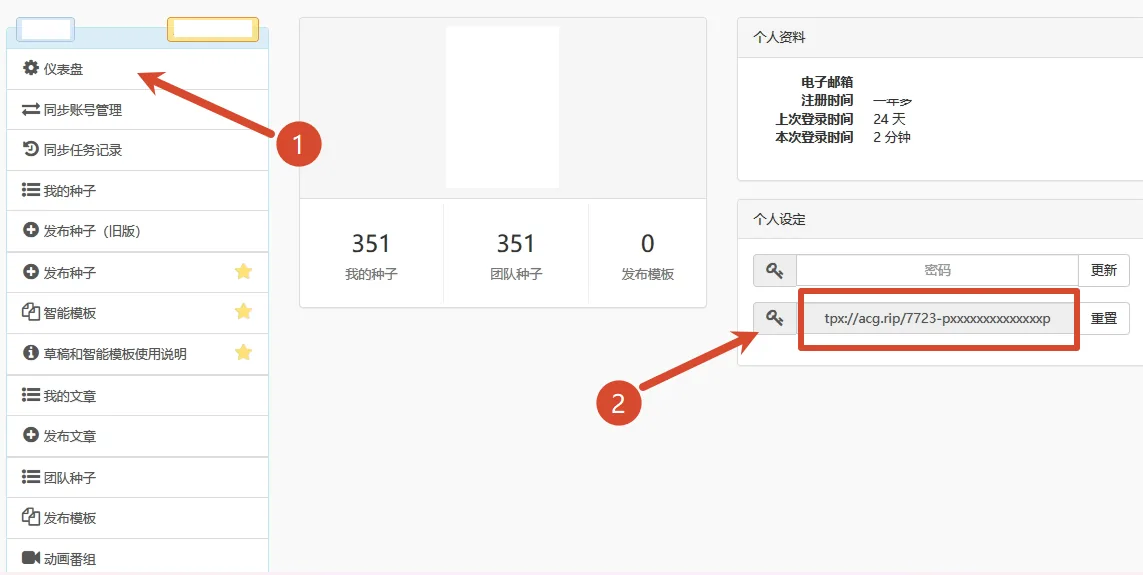
Copy API Token
Under the Personal Settings section on the right side, find the second item: API Token. Copy the string, ensuring it matches the standard format without prefixes or surrounding spaces:
7723-pxxxxxxxxxxxxxxpSave and Test in AniBT
Visit your fansub console at /groups/<slug>/sync, enter the token in the ACG.rip card, click Save, and execute Test Connection.
Field Descriptions
Prop
Type
Diagnostic Results
Prop
Type