
ACGNX Sync
Learn how to retrieve your ACGNX UID and API Token, configure automated cross-publishing, and test connection credentials.
Configuring ACGNX sync automatically submits your anime releases from AniBT to the ACGNX distribution platform.
ACGNX utilizes independent API Token authentication. When copying your UID and Token, ensure no leading or trailing whitespace is accidentally included.
Setup Workflow
Open ACGNX API Settings
Log in to ACGNX (share.acgnx.se) and click Publish Resources in the upper left. In the left navigation, navigate to User Control Center → Account API Settings.
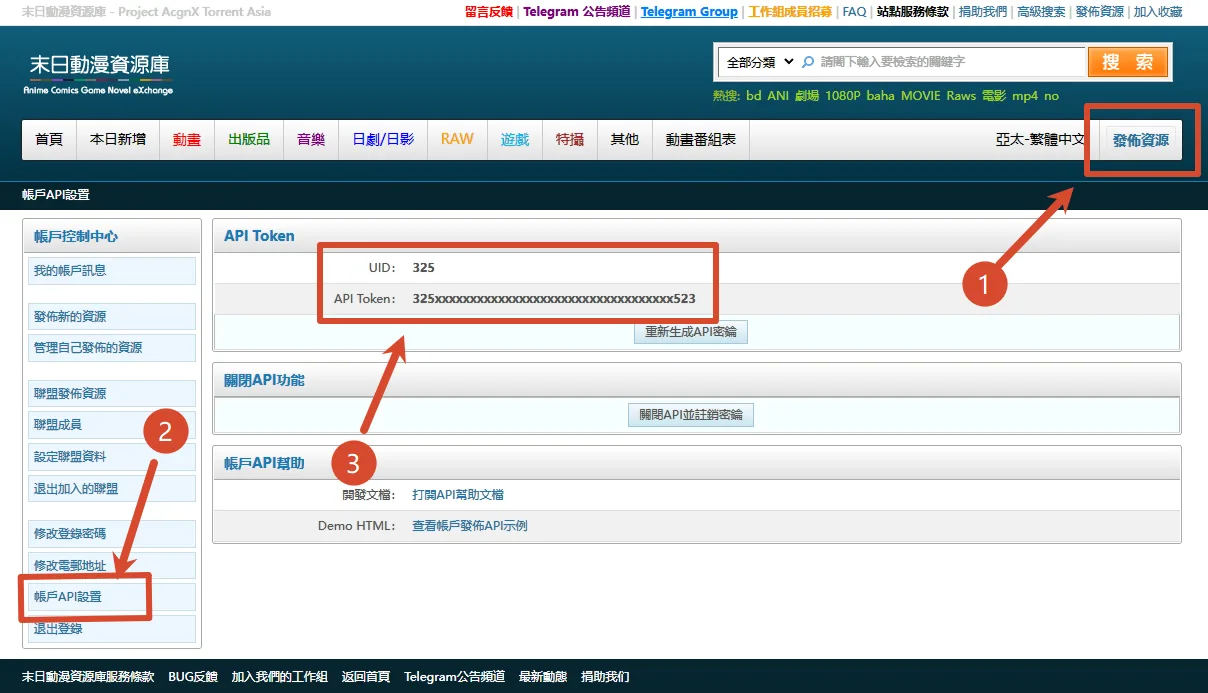
Copy UID & API Token
Locate your numeric UID and the accompanying API Token. Generate a token if one is not already assigned.
Save and Test in AniBT
Open your fansub console at /groups/<slug>/sync, enter your UID and API Token in the ACGNX card, click Save, and run Test Connection.
Field Descriptions
Prop
Type
Diagnostic Results
Prop
Type